Switch with clarity

Is an image editor alternative free right for your workflow?

A free image editor alternative can reduce software overhead, but the right choice depends on what you edit, how often you work, and which controls you cannot lose. Use this comparison to separate genuine savings from hidden tradeoffs.

This page is an image-editing guide, not an editor. The link opens Supavisual’s home page without carrying a prompt or image. Sign in there to upload; an eligible paid subscription is required for AI tools. Any paired images here are illustrations of concepts, not verified processing results from this site or Supavisual.

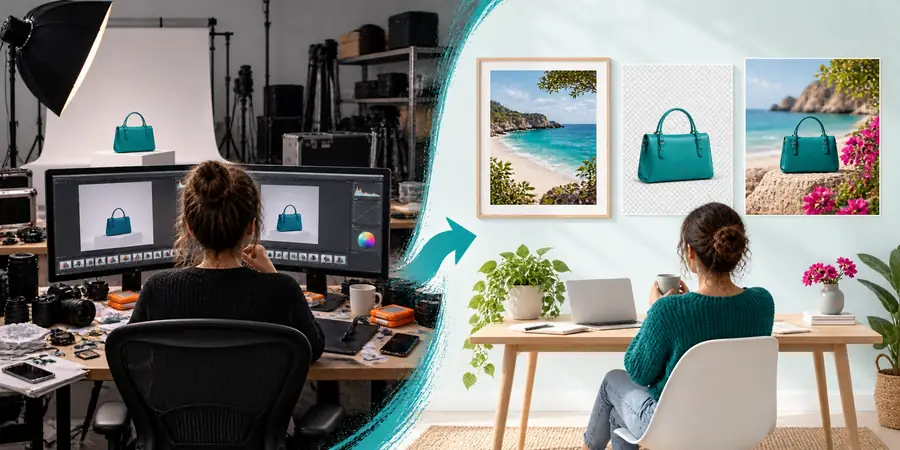
Comparison view of an image editor alternative free workflow

Check the limits

Limits to check before switching

A free image editor alternative is useful when your work is lightweight or occasional, but it is not automatically a replacement for every professional workflow.

Advanced color management may be limited

Some browser-based or lightweight tools do not provide the same depth of color profiles, soft proofing, or print-focused controls as a full desktop suite.

WorkaroundKeep a color-managed desktop application for final print preparation and use the lighter editor for drafts, crops, and web assets.

Complex layer systems can feel simpler

Basic compositing, masks, adjustment layers, and blend modes may be less extensive or less familiar than the tools you already use.

WorkaroundTest one layered project before moving everything. Flattened exports and clearly named source files make a gradual transition safer.

Large files may not be the ideal fit

Very high-resolution images, long editing sessions, or many open documents can expose limits in browser memory, device performance, or file handling.

WorkaroundResize working copies, close unused documents, and preserve the original separately before making edits.

Automation may require another tool

Batch processing, macros, plug-ins, and repeatable production pipelines are often the first capabilities to differ from a mature paid application.

WorkaroundKeep a dedicated batch utility or script for repetitive jobs while using the alternative for individual image decisions.

A sensible trial

How time changes across the workflow

Switching is easier when you compare the complete job rather than the first five minutes. Measure setup, editing, review, and export together.

List the work you repeat

Write down the edits you perform every week: crop, resize, remove a distraction, correct exposure, add text, prepare a social image, or export several versions. This prevents an attractive feature list from distracting you from actual habits.

Rebuild one representative project

Use a real image with the same dimensions, layers, text, and output needs as your normal work. Compare not only the result, but also how many steps it takes to reach a clean export.

Review the handoff

Check naming, file compatibility, export quality, and whether another person can open or continue the project. A faster edit is not a time saving if it creates rework later.

Choose a mixed workflow when needed

You do not have to replace every tool. Keep the alternative for quick corrections and routine visual work, then reserve a heavier application for specialist tasks.
Total cost

Total cost: what you really trade

The visible price is only one part of the decision. Include setup, learning time, storage, file handoff, and the cost of keeping a second tool for specialist work.

Free alternative Established paid editor
1

Upfront software cost

Free alternative

Often little or no software payment, depending on the product and access model.

Established paid editor

Usually requires a subscription, license, or other paid access arrangement.

2

Hardware and access

Free alternative

May work on a wider range of devices, but performance still depends on the browser, connection, and local hardware.

Established paid editor

Typically needs a compatible installation and enough local storage and processing power.

3

Learning investment

Free alternative

A simpler interface can shorten the first session, though unfamiliar controls still take practice.

Established paid editor

More extensive tools can require more learning, but established skills may transfer from earlier projects.

4

File compatibility

Free alternative

Common image exports are usually straightforward; layered or application-specific files need testing.

Established paid editor

Mature formats and established handoff conventions can reduce friction with teams and clients.

5

Repeatable production

Free alternative

Good for individual edits, but batch tools and automation may be narrower.

Established paid editor

More likely to support actions, plug-ins, scripts, and production workflows.

6

Support and continuity

Free alternative

Documentation and support can vary, so keep originals and test important projects.

Established paid editor

Paid products often provide a more formal support and update path.

7

Best financial fit

Free alternative

Strong for occasional work, learning, quick corrections, and low-risk visual tasks.

Established paid editor

Often easier to justify when editing is frequent, collaborative, or business-critical.

Who benefits

When switching is worth it

The strongest case is not always the person seeking the most features. It is the person whose real work matches the alternative’s strengths.

Occasional creator

You edit a few photos each month for posts, invitations, listings, or personal projects.

A lighter workflow can remove recurring software expense and make simple edits easier to start.

image editor free

Small business owner

You need quick crops, background cleanup, resizing, and branded text without maintaining a design workstation.

A free alternative can cover routine marketing assets while leaving specialist work to a contractor or dedicated tool.

image editor alternative online

Student or learner

You are building editing skills and need a practical place to understand layers, selections, adjustments, and exports.

Starting with a focused tool can make fundamentals less intimidating before you decide whether advanced software is necessary.

image editor vs photoshop

Production professional

You process many images, depend on exact color output, or exchange layered files with a team every day.

Switching completely may create more friction than savings, but using an alternative for quick tasks can still reduce interruptions.

image editor alternative online

See the tradeoff

Where quality differs in practice

The right comparison is not simply whether an image looks attractive at a glance. It is whether detail, text, color, and export quality remain dependable at the size and destination you need.

Starting image

Original image prepared for comparison
Edited image showing a cleaner finished result
Edited output

Compare at final output size, then inspect fine detail, text edges, skin tones, and compression. A free image editor alternative may look excellent for web use while requiring more checking for print or client delivery.

Make the next edit

Try the lighter workflow on one real project

Start with a representative image instead of moving your entire archive. Test the edits you actually repeat, compare the finished file with your current process, and keep the workflow that saves effort without creating avoidable rework.

  • Use a copy of the original
  • Check export quality at the final size
  • Keep a second tool for specialist work

Comparison FAQ

Free alternative questions to settle first

A short checklist can prevent the most common mistake: choosing by price before checking the work the editor must handle.

Compare the tasks you perform most often, not just the number of visible tools. Check file compatibility, export quality, layer behavior, device performance, privacy expectations, and whether the workflow fits the images you actually deliver.

Sometimes, especially for crops, resizing, corrections, simple composites, and web graphics. A full replacement is less likely when you depend on advanced color management, batch automation, plug-ins, complex layered files, or frequent team handoffs.

It can reduce time when the interface is easier to access and your edits are routine. It may take longer if you must recreate familiar shortcuts, find missing controls, convert files, or repeat checks that your current editor handles automatically.

No. Quality depends on the source file, processing method, export settings, resizing behavior, and the destination where the image will be used. Test a real project at its final web, presentation, or print size instead of judging only the editor preview.

A mixed workflow is often the safest choice. Use the free option for quick, low-risk edits and keep your established application for specialist, collaborative, or production-critical work until the alternative proves reliable.

Start creating
Start creating